


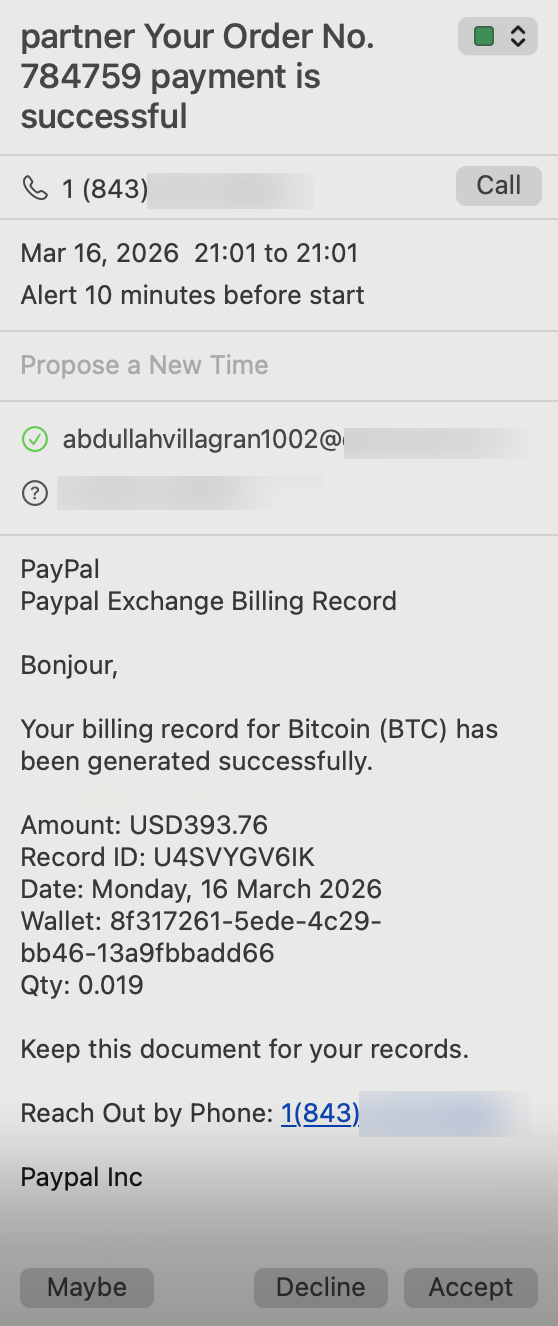
 Your calendar is now the new frontier in spam.
Starting a month or so ago, I started getting meetings popping up on my calendar, like the one shown to the left. Out of nowhere, I’d get a reminder telling me that I had a meeting that was about to start.
I didn’t know the inviter. I hadn’t accepted the meeting. And they often fired with very little notice.
They were clearly spam, telling me that some payment needed to be reviewed or some order had failed, with a number to call. They were being sent from random email addresses and claiming to be “PayPal support” and other such nonsense.
On iOS, there is no way to just delete a calendar reminder. You can decline it, but I feared that this was like clicking unsubscribe on a spam email: all you’re doing is informing the spammer that your email is valid. You can delete them on macOS, but who wants to pull out one’s laptop every time you get a spam.
And even if I could delete them on iOS, I was still getting notified about them. As I said, they often arrived minutes before the “meeting” was to start.
I got quite a few of these annoying “meetings”. They were coming in via stealth mode, somehow being sent to me.
I googled and AI’d and most of the answers were out of date or simply inaccurate. The most popular advice was to turn off the calendar that is spamming you. But that misses the point entirely. They’re showing up on my main calendar, and I want that calendar to show up on my phone.
How were these even getting added?
Answering that question lead me to the solution.
The Fix
Obviously, they were coming in via email of some sort, as they were showing up on a calendar in my Gmail domain. There’s nothing in the mail settings to address this, so I looked at the Calendar settings.
Sure enough, there is an option called “Add invitation to my calendar”. By default, it’s set to “from everyone”. This means anyone on the planet can send you an invite and it’s added to your calendar.
I changed it to “when I respond to an invitation in email”.
And the problem vanished.
I can’t wait to see what technological loophole spammers innovate on next.
Related Posts:
The Week Big Tech Failed Me: Google and Meta Both Outdone by a $10/Year Provider
The Mailbird Scam: When a "Lifetime" License is Not Lifetime
Provider Tip: "SMTP Test" is Rarely an SMTP Test
ACTION REQUIRED: Prepare Your DMARC Policy for Gmail & Yahoo 2024 Requirements!
Google is Upgrading Your Storage for Free
Virtual Gear Dump: raindog308's Empire of Cheap VPS and Cheap Shared Hosting

raindog308 is a longtime community LETizen, technical writer, and self-described techno polymath. With deep roots in the *nix world, he has a passion for systems both modern and vintage, ranging from Unix, Perl, Python, and Golang to shell scripting and mainframe-era operating systems like MVS. He’s equally comfortable with relational database systems, having spent years working with Oracle, PostgreSQL, and MySQL.
As an avid user of LowEndBox providers, raindog308 runs an empire of LEBs, from tiny boxes for VPNs, to mid-sized instances for application hosting, and heavyweight servers for data storage and complex databases. He brings both technical rigor and real-world experience to every piece he writes.
Beyond the command line, raindog308 has a life-long love of German Shepherd Dogs, high-quality knives, target shooting, theology, tabletop RPGs, playing guitar, and hiking in deep, quiet forests.
His goal with every article is to help users, from beginners to seasoned sysadmins, get more value, performance, and enjoyment out of their infrastructure.
You can find him daily in the forums at LowEndTalk under the handle @raindog308.



















Leave a Reply