


We’re in the middle of a series on LowEndBoxTV on the exploding world of AI companions. This market is huge and millions of people are using these applications and services. We’re going to give you a comprehensive overview, a deep dive into the tech, some problems and issues, the major options, and finally a DIY tutorial using SillyTavern. Enjoy!
Welcome to part two of our video series on the growing and very popular world of AI companions. In part one of this series, we gave an introduction to AI companions, and covered the different ways people are using these services and technologies.
Now we’re going to get into exactly how these systems work. Whether you use a commercial service or you roll your own, it’s still a prompt to an LLM on the backend, but there’s a lot more to it and I think you’ll find this interesting. So let’s get into it.
When you are chatting with an AI, there isn’t really a conversation per se happening. the LLM has no concept that you’re having a conversation with it.
What’s happening is that all the conversation up to that point is being sent across, plus some foundational documents, plus your new message, and the AI then formulates a response.
And forms that from scratch, every time! That’s a real key realization. The AI isn’t “keeping state” in the sense that two humans having a conversation would. Instead, the entire conversation is sent to the AI and the AI responds. So if you’ve exchanged 100 messages, all 100 are sent over. You could take the entire conversation and point it over at another AI and continue the conversation, because the first AI is not keeping any state.
Now, there’s an important term which is really key in these sorts of applications. In fact, it’s probably the most important parameter to understand: context window. This is the maximum amount of data you can send. When these chat applications started, context windows were very small – 16K or 32K. Today, some of the frontier models offer windows up to 1 million tokens. A token isn’t exactly a word or syllable, but it correlates so you can think of it as a word or a word-part for our purposes here.
In general, bigger context window are better, but there’s a couple hitche.
First, for cost reasons, you’re probably not going to use a 1 million context window. Maybe you’ll use 200K.
But even then, it turns out that LLMs really don’t scale to these massive context windows. The longer a window, the more their performance drops off. The reasons for this are complex and I’ll refer you to a couple good papers rather than go in-depth here, but it turns out that large language models are not actually reading the context the way a human would. As the prompt gets longer, the model has to distribute its attention across more and more tokens. That means the signal from the important information gets diluted.
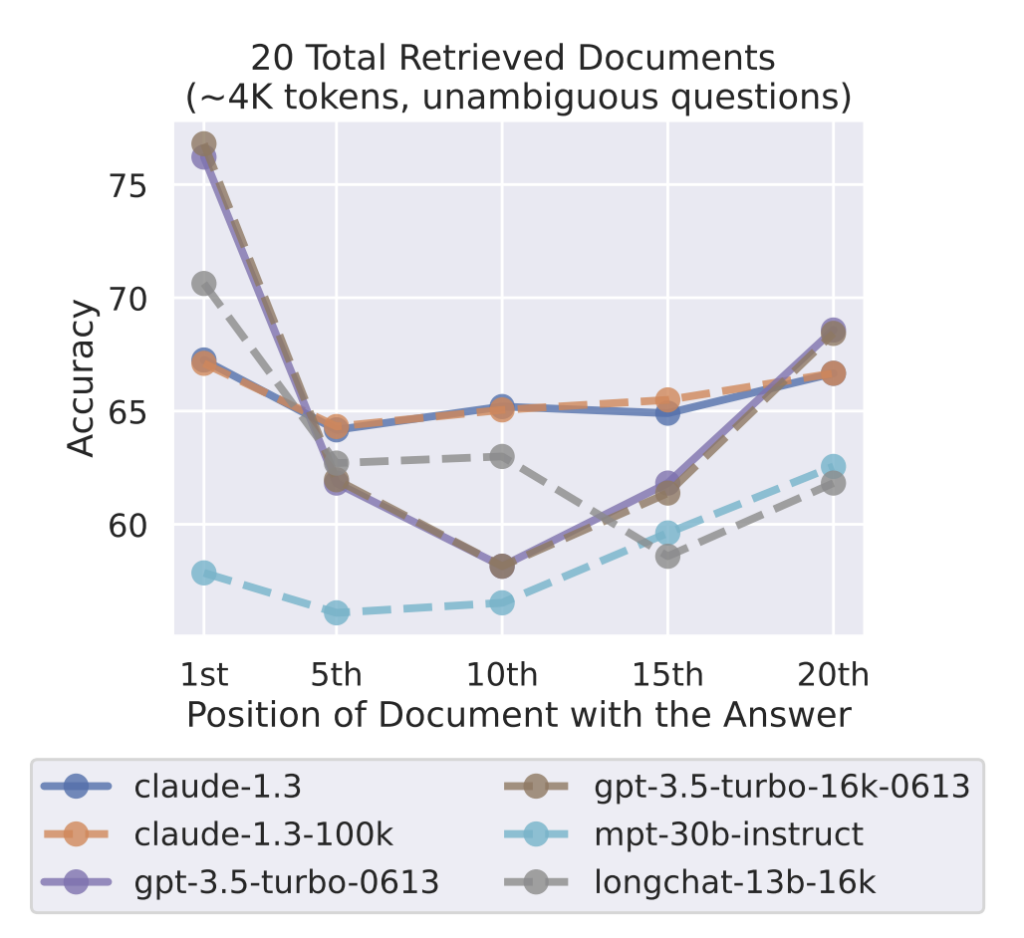
Research like the Lost in the Middle paper shows that models tend to pay the most attention to the beginning and the end of a prompt. Information buried in the middle is much more likely to be ignored or misused. In experiments, model accuracy dropped significantly when the answer was placed in the middle of a long context window.
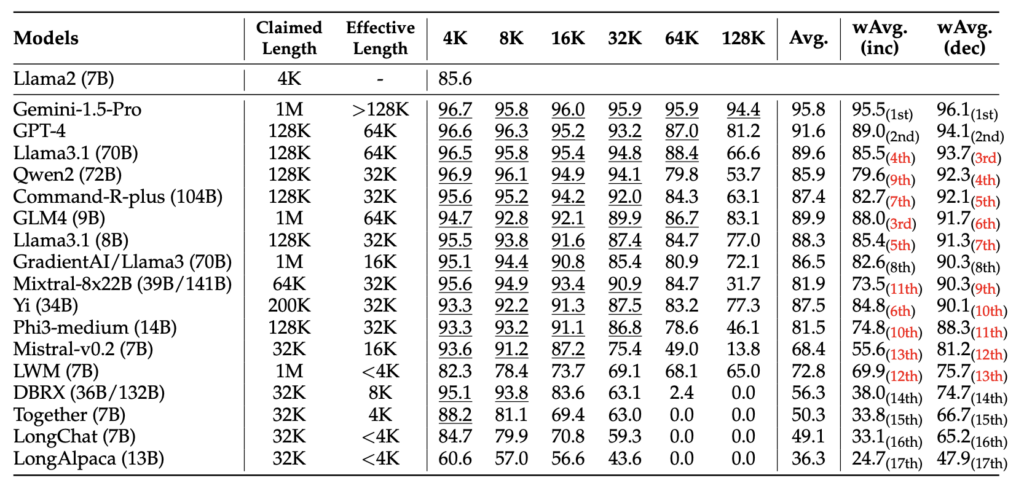
Another benchmark called RULER tested how models behave as the context length increases. What they found is that many models perform very well at small contexts like 4K or 8K tokens, but their accuracy steadily declines as the window grows to 32K, 64K, or 128K tokens. In other words, the advertised context window may be huge, but the effective reasoning window is often much smaller.
For example, a Llama 3 model with 8 billion parameters may advertise a 200K context window, but its effective context window is only 32K.
So managing your context window is really key!
And it gets worse, in a way, because the messages aren’t all you have to send.
Let’s talk about that. But first, we’d really appreciate if you’d show this video some love with a like, and go ahead and subscribe if you could. Thanks so much.
Now, let’s talk about the three tiers of data, because that’s the way these systems work.
First, there’s a base of static data that doesn’t change from query to query. This includes several things. There’s what’s called a system prompt, which sets the stage for what the LLM is doing. After all, the LLM is built to answer anything – code questions, math questions, whatever. You have to tell it that this is a chatting experience. So the system prompt includes directives explaining that you are roleplaying. It would also include statements telling the AI to stay in character, to honor some boundaries (or not), what the rules are, giving permission for agency, etcetera.
Next is the scenario definition. Are we talking in current time, World War II, the far future, or Middle Earth? Is this light-hearted romance, a tense mystery, a Dungeon and Dragons roleplaying game, or something else?
The comes the character definition. These can be very involved and character cards, as they’re termed, can be easily be 500, a thousand, two thousand, or more words. These cover everything – the character’s appearance, personality, history, goals, likes and dislikes, example dialogue, secrets, etc.
Then finally comes the user’s definition, sometimes called a Persona.. You want the character to remember some things about you – your name, some basic facts.
So what’s actually sent to the LLM to get a response is usually these four things – system prompt, scenario, chararacter card, persona – plus all the message history.
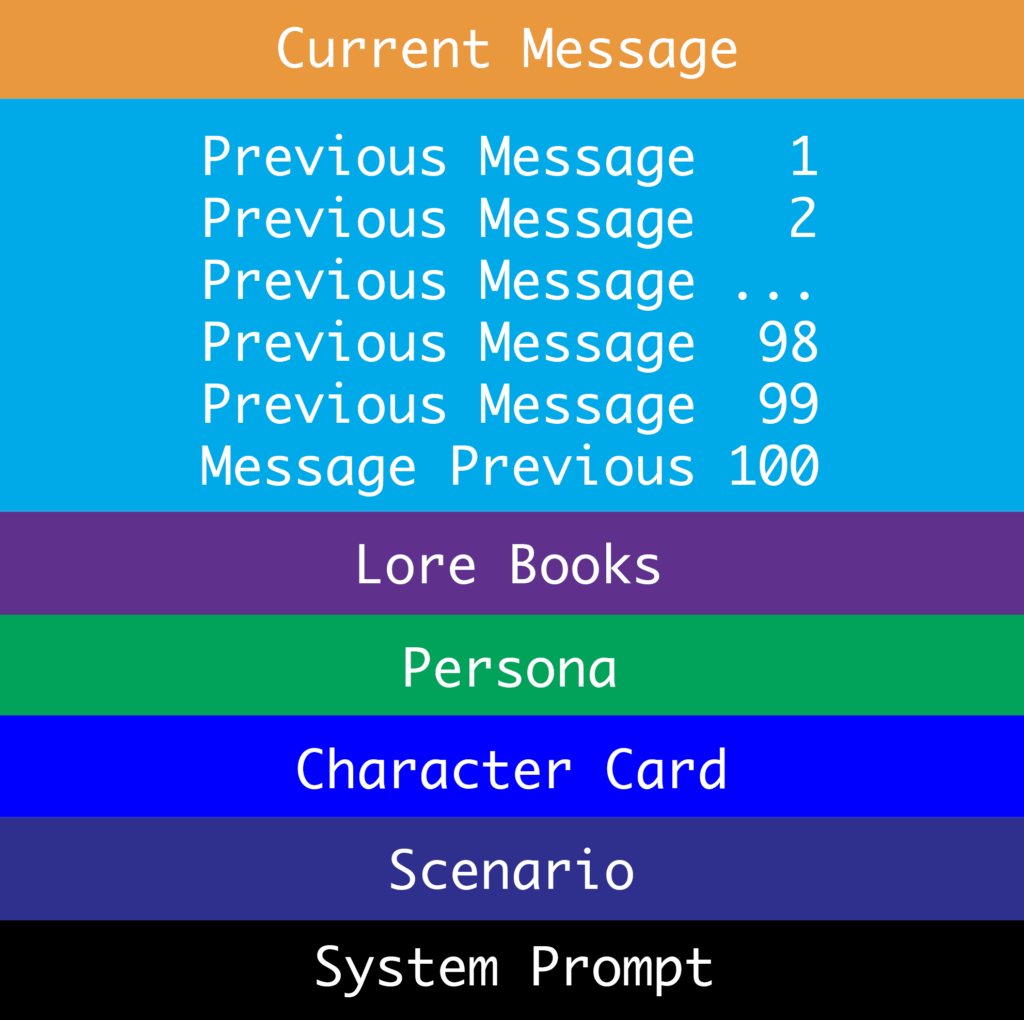
Now, that core data – the four things I mentioned – can easily chew up 4K or 8K on its own. So already your chat history is getting squeezed. This leads to memory fall off, where once you exceed either the actual or the useful context window, messages are lost.
In some ways, it can resemble talking with someone in the early stages of dementia. Such people often remember facts before dementia set in – who they are, where they were born, important events in their life. And they can remember the current topic of conversation. But the time they fell last week or the birthday party they went to last weekend? It’s gone.
And what happens here is that AIs typically don’t just fail to remember, but instead they hallucinate to invent facts. Nothing breaks immersion faster than to have a long conversation and then have the AI completely remember it mon
There is an important technique used in AI chats to combat this, and it’s the final piece ofbthe puzzle: lorebooks.
Lorebooks are established facts and info about the world. These can be character histories, other characters, things that have happened, world background, etc. But who’s going to write all that? And of course, to include this data, you burn up part of your context window.
So what sophisticated chat applications do is use a technique of automated lorebook, keyword-indexed creation. Here’s how it works.
Let’s say I’m chatting with my AI about buying a new car. During the chat we discuss models I looked at, a dealer I visited, the salesman named Mike who was pushy about the extra warranty, and finally how I settled on a Subaru Forester. As messages scroll by, they’re automatically summarized and indexed with keywords, such as “Subaru” and “Forester” and perhaps “Mike”.
Months later, when this is long out of the context window, I send a message saying I’m taking my Subaru in for maintenance. As the client assembles the prompt to send to the chat engine API, it scans the words in my message and cross-references them with the keywords in lorebooks. The “Subaru” would be a hit, so it would add that Lorebook to the full stack of info sent to the API.
This avoids a lot of problems. It eliminates the “dementia” problem where pertinent info scrolls out of the context window and is lost. It also eliminates the effective context window problem, since it’s not dumping a million words to the API but rather only selective, relevant conversations.
Most clients also allow you to write manual lorebooks and specify those are always included.
So that’s how the tech works. You are sending a base of information – system prompt, character card, persona, and lorebooks – along with message history and the next message to the API, which processes that as a bundle to determine its response.
I have one more thing to mention before we wrap up, and that’s the Thinking section. A lot of APIs and models will share their thinking process with the client. So if you send a message, you can see the AI thinking to itself something like “OK, I’m roleplaying with the character, and this is a pivotal moment because the user is asking me to make a choice. Looking at my character card, I see my character is opposed to the proposed course of action, but also have to factor in…” etc.
This is fascinating to watch sometimes. It’s obviously immersion-breaking because in real human conversations, you don’t get to read other people’s thoughts. But it’s a fascinating way to learn what’s going on behind the scenes.
OK, so next time we’re going to get into the options available for AI companions. It’s quite a universe, so be sure to join us.
If you had any questions on the tech we covered today, be sure to drop them in the comments below.
Thanks for joining, and watch this space as we roll out the rest of this series!
Related Posts:
LowEndBoxTV: AI Companions, Part 1: An Introduction to the Massive World of AI Companionship and Rom...
25% of Americans Have an "Intimate, Romantic" Relationship With an AI Chatbot
"An Extremely Interesting Early Morning": An AI Agent Wrote a Hit Piece Targeting a Developer After ...
How AI Intermediation Will Wreak Havoc. It Already Is. Here Are Some Examples.
The Year Ahead: Our Predictions for 2026
When It Comes to AI, Are You a Maximalist, a Skeptic, or a Gartner Analyst?

raindog308 is a longtime community LETizen, technical writer, and self-described techno polymath. With deep roots in the *nix world, he has a passion for systems both modern and vintage, ranging from Unix, Perl, Python, and Golang to shell scripting and mainframe-era operating systems like MVS. He’s equally comfortable with relational database systems, having spent years working with Oracle, PostgreSQL, and MySQL.
As an avid user of LowEndBox providers, raindog308 runs an empire of LEBs, from tiny boxes for VPNs, to mid-sized instances for application hosting, and heavyweight servers for data storage and complex databases. He brings both technical rigor and real-world experience to every piece he writes.
Beyond the command line, raindog308 has a life-long love of German Shepherd Dogs, high-quality knives, target shooting, theology, tabletop RPGs, playing guitar, and hiking in deep, quiet forests.
His goal with every article is to help users, from beginners to seasoned sysadmins, get more value, performance, and enjoyment out of their infrastructure.
You can find him daily in the forums at LowEndTalk under the handle @raindog308.






















Leave a Reply