


 It seems like nearly every day, there’s a new round of AI-fueled CVEs. You have to stay on top of patches, updates, and upgrades. The days when you can setup a Linux box and enjoy months of uptime are gone, unless all its network interfaces are unplugged.
Fortunately, Debian makes it easy to get a continuous stream of upgrades with the unattended-upgrades package. It’s part of my normal Ansible-powered setup for new VMs, but I noticed something troubling the other day.
I had a Debian 13 (Trixie) system with unattended-upgrades installed that had been running a while and out of curiosity, I ran an apt update:
# apt update
Hit:1 http://deb.debian.org/debian trixie InRelease
Hit:2 http://deb.debian.org/debian trixie-updates InRelease
Hit:3 http://security.debian.org/debian-security trixie-security InRelease
30 packages can be upgraded. Run 'apt list --upgradable' to see them.
…whaaaaaaaa!?!?
How can that be? Before you ask, this isn’t a case where 30 packages just came out that morning. Were they all non-security updates? Nope:
# apt list --upgradeable
bsdextrautils/stable-security 2.41.5-0+deb13u1 amd64 [upgradable from: 2.41-5]
bsdutils/stable-security 1:2.41.5-0+deb13u1 amd64 [upgradable from: 1:2.41-5]
eject/stable-security 2.41.5-0+deb13u1 amd64 [upgradable from: 2.41-5]
fdisk/stable-security 2.41.5-0+deb13u1 amd64 [upgradable from: 2.41-5]
jq/stable-security 1.7.1-6+deb13u3 amd64 [upgradable from: 1.7.1-6+deb13u2]
(snip)
Was unattended-upgrades installed? Yes:
# dpkg -l | grep unattended
ii  unattended-upgrades               2.12                                 all          automatic installation of security upgrades
Was it enabled? Yes:
systemctl list-timers 'apt-daily*'
NEXT                        LEFT LAST                        PASSED UNIT                    ACTIVATES
Sat 2026-08-15 05:28:26 PDT  16h Fri 2026-08-14 07:33:38 PDT      - apt-daily.timer         apt-daily.service
Sat 2026-08-15 06:46:33 PDT  17h Fri 2026-08-14 06:38:38 PDT      - apt-daily-upgrade.timer apt-daily-upgrade.service
So what was going on?
I did some research and found something interesting:
# debconf-show unattended-upgrades
* unattended-upgrades/enable_auto_updates: false
A-ha! So on install, unattended-upgrades is installed, but not enabled. You can test this. If /etc/apt/apt.conf.d/20auto-upgrades doesn’t exist, then the package is installed, but it’s never been configured.
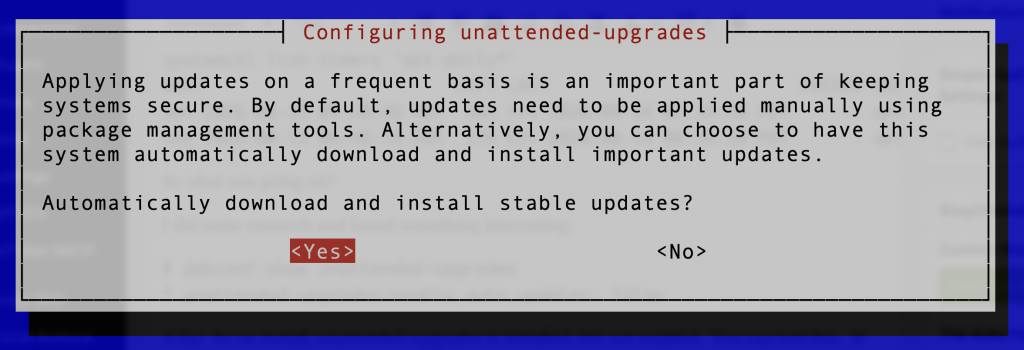
The quick fix is dpkg-reconfigure unattended-upgrades:
But Why?
I was curious, so I created a brand new Debian VM (installed from ISO). On first boot, unattended-upgrades was not enabled. The package was not installed yet.
# debconf-show unattended-upgrades
* unattended-upgrades/enable_auto_updates: false
After apt update and apt install unattended-upgrades, thedpkg-reconfiguredid not fire automatically. And the system still shows:
# debconf-show unattended-upgrades
* unattended-upgrades/enable_auto_updates: false
Hmm. Is this a bug?
No, it’s by design. Debian’s installer uses pkgsql, which has this code:
if [ "$RET" = none ]; then
  # We might pull in unattended-upgrades, which defaults to doing security
  # updates automatically. Seed it to have auto updates disabled so that if
  # we *do* pull it in, it won't break stuff.
  echo 'unattended-upgrades unattended-upgrades/enable_auto_updates boolean false' | \
  log-output -t pkgsel chroot /target debconf-set-selections || true
So it’s by design. It’s not a design I think I agree with. apt should either automatically enable or at least ask you if you want to enable by firing dpkg-reconfigure.
The unattended-upgrades package itself defines its debconf question with:
Template: unattended-upgrades/enable_auto_updates
Type: boolean
Default: true
So its own default is true. But debconf already has an explicit value of false left behind by the Debian installer. The package’s configuration script asks the question at low priority:
db_input low unattended-upgrades/enable_auto_updates || true
db_go
Then postinst retrieves the value:
db_get unattended-upgrades/enable_auto_updates
In short, what happens is:
- The Debian installer seeds
enable_auto_updates=false - You
apt install unattended-upgrades - Package default is true
- But false is already seeded
- Question is low priority, so you’re not asked to reconfigure
enable_auto_updatesremains false
dpkg-reconfigure, however, low-priority questions. Per the man page: “dpkg-reconfigure normally shows low priority questions no matter what your default priority is.” So when that is run, it asks you if you want to enable.
Hmmm. Well, now I understand how we got here, but it doesn’t change my opinion. I guess unattended-upgrades is analogous to a service you install but still have to enable. Still, I would think that if a user explicitly installs the package, it should be enabled because the high likelihood is that the user wants it enabled. A flow where the package is enabled by default and can be disabled after install if that’s what the user really wants makes more sense to me.
Ansible
Personally, I set all my VMs up with Ansible. Just adding unattended-upgrades to your list of apt packages won’t enable it, but setting the debconf policy first will:
- name: Enable unattended upgrades in debconf
  ansible.builtin.debconf:
    name: unattended-upgrades
    question: unattended-upgrades/enable_auto_updates
    value: 'true'
    vtype: boolean

- name: Install unattended-upgrades
  ansible.builtin.apt:
    name: unattended-upgrades
    state: present
Stay safe out there!
Related Posts:
The Contagious Interview: The Slimeyness of LinkedIn is Truly Becoming Next Level
Yeee-ouch! Guest-to-Host Escape Vulnerability in Linux KVM/x86
ELI5: Why is Everything Being Rewritten in Rust?
The YouTube App is an Authenticator...and That's a Problem
You Should Update Your Debian System Every Night, Unattended and Automatic.
Should You Run FreeBSD in 2026? Maybe, Maybe Not

raindog308 is a longtime community LETizen, technical writer, and self-described techno polymath. With deep roots in the *nix world, he has a passion for systems both modern and vintage, ranging from Unix, Perl, Python, and Golang to shell scripting and mainframe-era operating systems like MVS. He’s equally comfortable with relational database systems, having spent years working with Oracle, PostgreSQL, and MySQL.
As an avid user of LowEndBox providers, raindog308 runs an empire of LEBs, from tiny boxes for VPNs, to mid-sized instances for application hosting, and heavyweight servers for data storage and complex databases. He brings both technical rigor and real-world experience to every piece he writes.
Beyond the command line, raindog308 has a life-long love of German Shepherd Dogs, high-quality knives, target shooting, theology, tabletop RPGs, playing guitar, and hiking in deep, quiet forests.
His goal with every article is to help users, from beginners to seasoned sysadmins, get more value, performance, and enjoyment out of their infrastructure.
You can find him daily in the forums at LowEndTalk under the handle @raindog308.
























Wow, good catch. A bunch of the dnstools.ws nodes didn’t enable unattended-upgrades properly. I’ll add the config option to my Ansible playbook. Thanks!!
Glad to be of service! I really think this should be enabled/dpkg-configure’d by default if you install unattended-upgrades. I think the ratio of people who install unattended-upgrades and want it to be live vs. those who install it but don’t want to be immediately enabled is probably 100,000:1.