


 Ages ago, I was a Solaris admin. That operating system is nearly dead at the hands of Oracle, but a community of derivatives lives on. And one of these is Tribblix:
Tribblix is an operating system distribution derived from OpenSolaris, OpenIndiana, and illumos, with a retro style and modern components. The base kernel and commands come from illumos, with everything else rebuilt from scratch.
Tribblix is a traditional system. Software is distributed as SVR4 packages, lightweight window managers are preferred over heavy desktop environments, the primary desktop option is Xfce, and MATE and Enlightenment are also available, plus many others. The system is flexible, fast, and familiar to those who’ve used Solaris in the past, while shipping modern software on the solid foundation it’s based on.
Tribblix isn’t just a spin or repackaging of another illumos distribution. It’s a completely independent distribution that, while sharing the key illumos technologies such as ZFS, zones, DTrace, and SMF, has been essentially built from scratch, with its own build and packaging system.
I’m going to try really hard to avoid The Trouble With Tribblix jokes…
So if you consider x86 Unix-like systems, your choices are:
- Linux, available in many distros
- The BSDs (Free, Open, and Net)
- Some proprietary systems that still linger on
- Minix, a teaching OS you can still download and run
- The Solaris-based distros
Always fun to see how other projects do things, so let’s give it a spin. I’m using 0m40 (version 0, milestone 40).
I spun up a 4c/4GB VPS on my home Proxmox. I won’t rehash the install instructions for Tribblix, which are pretty straightforward. You boot off the CD, login, su to root, find out the name of your disk, and then run the live_install.sh script.
I just installed the basics which…turns out perhaps to have been a mistake. More on that later.
First Boot
After logging in as “jack” (the default user), here’s what ps showed:
jack@tribblix:~$ ps -ef
UID PID PPID C STIME TTY TIME CMD
root 0 0 7 11:52:24 ? 0:01 sched
root 4 0 0 11:52:24 ? 0:00 kcfpoold
root 5 0 0 11:52:24 ? 0:01 zpool-rpool
root 1 0 0 11:52:25 ? 0:00 /sbin/init
root 2 0 0 11:52:25 ? 0:01 pageout
root 3 0 0 11:52:25 ? 0:00 fsflush
root 529 1 0 11:52:42 ? 0:00 /usr/lib/inet/inetd start
root 9 1 0 11:52:25 ? 0:01 /lib/svc/bin/svc.startd
root 11 1 0 11:52:25 ? 0:04 /lib/svc/bin/svc.configd
root 112 1 0 11:52:29 ? 0:00 /usr/lib/pfexecd
netadm 47 1 0 11:52:28 ? 0:00 /lib/inet/ipmgmtd
netcfg 44 1 0 11:52:28 ? 0:00 /lib/inet/netcfgd
dladm 40 1 0 11:52:28 ? 0:00 /sbin/dlmgmtd
root 175 1 0 11:52:30 ? 0:00 /usr/lib/rcm/rcm_daemon
root 733 1 0 11:52:42 ? 0:00 /usr/sbin/sshd
root 393 9 0 11:52:31 ? 0:00 /usr/lib/saf/sac -t 300
root 162 1 0 11:52:30 ? 0:00 /usr/lib/zones/zonestatd
root 374 9 0 11:52:31 console 0:00 /usr/lib/saf/ttymon -g -d /dev/console -l console -m ldterm,ttcompat -h -p trib
root 248 1 0 11:52:30 ? 0:00 /usr/lib/picl/picld
root 169 1 0 11:52:30 ? 0:00 devfsadmd
root 81 1 0 11:52:29 ? 0:00 /lib/inet/in.mpathd
root 506 1 0 11:52:32 ? 0:00 /usr/sbin/in.routed
root 204 1 0 11:52:30 ? 0:00 /lib/inet/nwamd
root 148 1 0 11:52:30 ? 0:00 /usr/lib/sysevent/syseventd
root 283 1 0 11:52:30 ? 0:00 /sbin/dhcpagent
root 558 1 0 11:52:42 ? 0:00 /usr/sbin/syslogd
root 151 1 0 11:52:30 ? 0:00 /usr/lib/power/powerd
root 508 1 0 11:52:40 ? 0:00 /usr/lib/inet/in.ndpd
jack 739 737 0 11:52:49 pts/2 0:00 ps -ef
root 633 1 0 11:52:42 ? 0:00 /usr/perl5/bin/perl /usr/lib/intrd
root 372 1 0 11:52:31 ? 0:00 /usr/lib/utmpd
root 416 393 0 11:52:31 ? 0:00 /usr/lib/saf/ttymon
root 690 1 0 11:52:42 ? 0:00 /usr/sbin/nscd
root 426 1 0 11:52:31 ? 0:00 /usr/sbin/cron
daemon 513 1 0 11:52:42 ? 0:00 /usr/sbin/rpcbind
root 734 733 0 11:52:45 pts/1 0:00 /usr/lib/ssh/sshd-session -R
jack 736 734 0 11:52:48 pts/1 0:00 /usr/lib/ssh/sshd-session -R
jack 737 736 0 11:52:48 pts/2 0:00 -bash
root 611 1 0 11:52:42 ? 0:00 /usr/lib/fm/fmd/fmd
Some of that is familiar. Some ZFS, and “SAF” is a Solaris service management framework.
One thing that jumped out to me:
root 633 1 0 11:52:42 ? 0:00 /usr/perl5/bin/perl /usr/lib/intrd
What is that?
jack@tribblix:~$ file /usr/lib/intrd
/usr/lib/intrd: executable /usr/perl5/bin/perl script
$ vi /usr/lib/intrd
-bash: vi: command not found
Oh…it’s one of those kinds of operating systems where you have install everything.
more(1) was installed so I looked at the file, which has the Sun CDDL license but no comments on what it did. But the man page explained:
The intrd daemon is started at boot time to monitor the assignments
between interrupts and CPUs. If intrd decides that the current
assignments are imbalanced and harmful to system performance, it will
generate and implement new assignments.
OK, not as exciting as I’d thought.
nscd is running. I read to fast and thought it was nsd, but that’s the name service cache daemon.
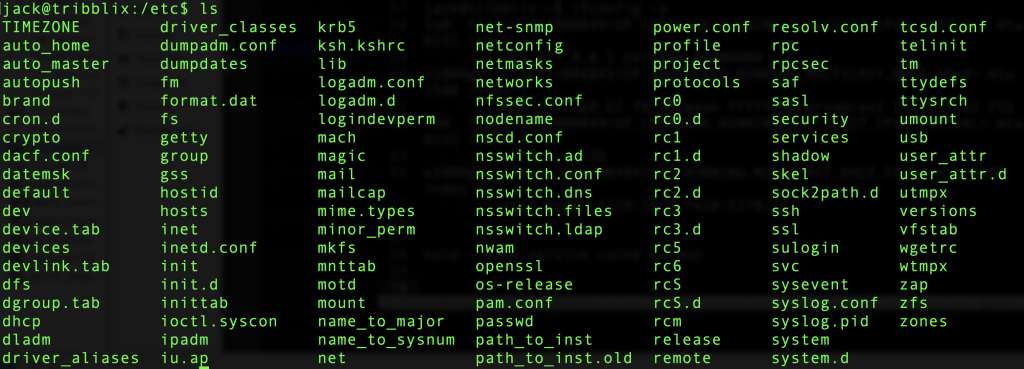
Naturally, there’s no systemd. In fact, Tribblix uses very traditional rc.d startup scripts. Check out /etc:
Installing vi: Attempt #1
I would like to have vi, so let’s try and install it. If I’d installed additional “overlays” during the live install, I’d probably have it, but since I don’t, it’s time to look at package management.
jack@tribblix:/etc$ man -k pkg
pkgadd(8) - transfer software packages to the system
pkgadm(8) - manage packaging system
pkgask(8) - stores answers to a request script
pkgchk(8) - check package installation accuracy
pkginfo(1) - display software package information
pkginfo(5) - package characteristics file
pkgmap(5) - package contents description file
pkgmk(1) - produce an installable package
pkgparam(1) - display package parameter values
pkgproto(1) - generate prototype file entries for input to pkgmk command
pkgrm(8) - remove a package from the system
pkgtrans(1) - translate package format
Unfortunately, the docs don’t say anything about how to find and install packages.
Maybe the packages are on the CD.
There is a document about how to use removable media. There’s nothing in my /media directory where I’d expect a CDROM to be mounted, so I followed the doc and installed the packages and ran the svcadm commands to enable rmvolmgr, which should detect and mount removable media.
After doing those steps, I inserted a CDROM (.iso) in Proxmox (I’d removed it during the first boot) but it didn’t show up.
root@tribblix:/root# ls /media
root@tribblix:/root#
dmesg showed these lines:
Jul 25 12:04:38 tribblix pseudo: [ID 129642 kern.info] pseudo-device: eventfd0
Jul 25 12:04:38 tribblix genunix: [ID 936769 kern.info] eventfd0 is /pseudo/eventfd@0
Jul 25 12:05:17 tribblix pseudo: [ID 129642 kern.info] pseudo-device: devinfo0
Jul 25 12:05:17 tribblix genunix: [ID 936769 kern.info] devinfo0 is /pseudo/devinfo@0
Jul 25 12:05:19 tribblix scsi: [ID 583861 kern.info] sd0 at ata1: target 0 lun 0
Jul 25 12:05:19 tribblix genunix: [ID 936769 kern.info] sd0 is /pci@0,0/pci-ide@1,1/ide@1/sd@0,0
Jul 25 12:05:19 tribblix genunix: [ID 127566 kern.info] device pciclass,030000@2(display#0) keeps up device sd@0,0(sd#0), but the former is not power managed
Jul 25 12:05:19 tribblix svc.startd[9]: [ID 652011 daemon.warning] svc:/system/hal:default: Method "/lib/svc/method/svc-hal start" failed with exit status 95.
Jul 25 12:05:19 tribblix svc.startd[9]: [ID 748625 daemon.error] system/hal:default failed fatally: transitioned to maintenance (see 'svcs -xv' for details)
Jul 25 12:05:19 tribblix fmd: [ID 377184 daemon.error] SUNW-MSG-ID: SMF-8000-YX, TYPE: defect, VER: 1, SEVERITY: major
Jul 25 12:05:19 tribblix EVENT-TIME: Sat Jul 25 12:05:19 PDT 2026
Jul 25 12:05:19 tribblix PLATFORM: Standard-PC-(i440FX-+-PIIX,-1996), CSN: -, HOSTNAME: tribblix
Jul 25 12:05:19 tribblix SOURCE: software-diagnosis, REV: 0.1
Jul 25 12:05:19 tribblix EVENT-ID: e81356fd-5c1d-405f-b00b-d41b568e8583
Jul 25 12:05:19 tribblix DESC: A service failed - a start, stop or refresh method failed.
Jul 25 12:05:19 tribblix Refer to http://illumos.org/msg/SMF-8000-YX for more information.
Jul 25 12:05:19 tribblix AUTO-RESPONSE: The service has been placed into the maintenance state.
Jul 25 12:05:19 tribblix IMPACT: svc:/system/hal:default is unavailable.
Jul 25 12:05:19 tribblix REC-ACTION: Run 'svcs -xv svc:/system/hal:default' to determine the generic reason why the service failed, the location of any logfiles, and a list of other services impacted.
I tried to lookup some of the debugging steps listed. For example:
root@tribblix:/root# cat /var/svc/log/system-hal:default.log
[ Jul 25 12:05:17 Enabled. ]
[ Jul 25 12:05:17 Executing start method ("/lib/svc/method/svc-hal start"). ]
hal failed to start: error 1
[ Jul 25 12:05:19 Method "start" exited with status 95. ]
[ Jul 25 12:05:19 Rereading configuration. ]
Hmmm.
During the rmvolmgr install, there was reference to a zap command.
The zap utility is used to manage software packages, zones, and system upgrades on Tribblix.
The man page is very thin, but there is “zap help”, which gives various verbs like “search” and “whatprovides”.
root@tribblix:/root# zap whatprovides /usr/bin/vi
usr/bin/vieet f TRIBe19-efl
usr/bin/vi s TRIBeditor-vim
usr/bin/view s TRIBeditor-vim
usr/bin/vim f TRIBeditor-vim
usr/bin/vimdiff s TRIBeditor-vim
usr/bin/vimtutor f TRIBeditor-vim
usr/bin/vimdot f TRIBgraphviz
usr/bin/vips f TRIBlibvips
usr/bin/vipsedit f TRIBlibvips
usr/bin/vipsheader f TRIBlibvips
usr/bin/vipsprofile f TRIBlibvips
usr/bin/vipsthumbnail f TRIBlibvips
usr/bin/visualvm s TRIBv-visualvm
usr/bin/virtualenv s TRIBvirtualenv-python-313
usr/bin/viewres f TRIBx11-viewres
Eureka! OK, let’s try this…
root@tribblix:/root# zap install TRIBeditor-vim

Installing 2 packages:
TRIBeditor-vim
TRIBlibsodium

Fetching https://pkgs.tribblix.org/tribblix-m40//TRIBlibsodium.1.0.22.0.zap
Download TRIBlibsodium.1.0.22.0.zap checksum verified
Signature of TRIBlibsodium.1.0.22.0.zap verified
Fetching https://pkgs.tribblix.org/tribblix-m40//TRIBeditor-vim.9.1.2132.0.zap
Download TRIBeditor-vim.9.1.2132.0.zap checksum verified
Signature of TRIBeditor-vim.9.1.2132.0.zap verified
Installing TRIBlibsodium

Installation of  was successful.
Installing TRIBeditor-vim

Installation of  was successful.
Installed 2 packages
And vi works.
Quirks
I read once that the chief differences between Unices are in system startup, accounting, and package management. We’ve seen the startup is rc.d-based. Accounting is SVR4 (to be honest, it’s rarely used now and made more sense in days when many departments and users logged into a single system), and package management is different than Linux/BSDs.
I noticed a strange message on boot, which was captured in dmesg:
Jul 25 11:52:24 tribblix pci: [ID 370704 kern.info] PCI-device: pci1af4,1100@1,2, uhci0
Jul 25 11:52:24 tribblix genunix: [ID 936769 kern.info] uhci0 is /pci@0,0/pci1af4,1100@1,2
Jul 25 11:52:24 tribblix i8042: [ID 526150 kern.info] 8042 device: keyboard@0, kb8042 # 0
Jul 25 11:52:24 tribblix genunix: [ID 936769 kern.info] kb80420 is /pci@0,0/isa@1/i8042@1,60/keyboard@0
Jul 25 11:52:24 tribblix i8042: [ID 526150 kern.info] 8042 device: mouse@1, mouse8042 # 0
Jul 25 11:52:24 tribblix genunix: [ID 936769 kern.info] mouse80420 is /pci@0,0/isa@1/i8042@1,60/mouse@1
Jul 25 11:52:24 tribblix unix: [ID 950921 kern.info] cpu0: x86 (chipid 0x0 GenuineIntel 60FB1 family 15 model 107 step 1 clock 1800 MHz)
Jul 25 11:52:24 tribblix unix: [ID 950921 kern.info] cpu0: QEMU Virtual CPU version 2.5+
Jul 25 11:52:24 tribblix unix: [ID 551322 kern.info] KPTI enabled (PCID not supported, INVPCID not supported)
Jul 25 11:52:24 tribblix unix: [ID 417328 kern.warning] WARNING: cpu1: CPUID.0xD returns invalid value: hw_low = 0, hw_high = 0, xsave_size = 0, ymm_size = 0, ymm_offset = 0
Jul 25 11:52:24 tribblix unix: [ID 950921 kern.info] cpu1: x86 (chipid 0x0 GenuineIntel 60FB1 family 15 model 107 step 1 clock 1800 MHz)
Jul 25 11:52:24 tribblix unix: [ID 950921 kern.info] cpu1: QEMU Virtual CPU version 2.5+
Jul 25 11:52:24 tribblix unix: [ID 557947 kern.info] cpu1 initialization complete - online
Not sure what that means, but possibly because it’s a QEMU virtual CPU that Tribblix didn’t anticipate.
Also saw this on reboot:
root@tribblix:/root# reboot
bootadm: failed to open file: /rpool//platform/i86pc/kernel/unix: No such file or directory
I was trying to see what Tribblix would report about the hardware. There’s a /proc, but it’s solely process info. Then I remembered a little of my Solaris days and psrinfo:
root@tribblix:/proc# psrinfo -v
Status of virtual processor 0 as of: 07/25/2026 14:58:27
  on-line since 07/25/2026 12:08:57.
  The i386 processor operates at 1800 MHz,
        and has an i387 compatible floating point processor.
Status of virtual processor 1 as of: 07/25/2026 14:58:27
  on-line since 07/25/2026 12:08:57.
  The i386 processor operates at 1800 MHz,
        and has an i387 compatible floating point processor.
Status of virtual processor 2 as of: 07/25/2026 14:58:27
  on-line since 07/25/2026 12:08:57.
  The i386 processor operates at 1800 MHz,
        and has an i387 compatible floating point processor.
Status of virtual processor 3 as of: 07/25/2026 14:58:27
  on-line since 07/25/2026 12:08:57.
  The i386 processor operates at 1800 MHz,
        and has an i387 compatible floating point processor.
Accurate, though not as detailed as /proc/cpuinfo on Linux.
And prtconf will give you details on the hardware, such as:
Memory size: 4096 Megabytes…as well as various pci hardware.
Conclusion
I enjoyed spelunking around Tribblix. It reminds me of my early days when I was learning Unix and trying out different systems. Back then, there was AIX, HP-UX, Solaris, Irix, and more. In 2026, nearly everything is Linux, and the few things that aren’t are BSD. Poking around on another member of the great Unix family tree is fun.
I think I need to learn more about Solaris services, and ZFS to really take advantage of the OS. Time permitting, I’ll play around with Tribblix some more.

raindog308 is a longtime community LETizen, technical writer, and self-described techno polymath. With deep roots in the *nix world, he has a passion for systems both modern and vintage, ranging from Unix, Perl, Python, and Golang to shell scripting and mainframe-era operating systems like MVS. He’s equally comfortable with relational database systems, having spent years working with Oracle, PostgreSQL, and MySQL.
As an avid user of LowEndBox providers, raindog308 runs an empire of LEBs, from tiny boxes for VPNs, to mid-sized instances for application hosting, and heavyweight servers for data storage and complex databases. He brings both technical rigor and real-world experience to every piece he writes.
Beyond the command line, raindog308 has a life-long love of German Shepherd Dogs, high-quality knives, target shooting, theology, tabletop RPGs, playing guitar, and hiking in deep, quiet forests.
His goal with every article is to help users, from beginners to seasoned sysadmins, get more value, performance, and enjoyment out of their infrastructure.
You can find him daily in the forums at LowEndTalk under the handle @raindog308.




















Leave a Reply