


 Recently we shared an offer from ServerCrate, a provider that offers Restic-based backups. Here’s a brief explanation:
ServerCrate is a zero-knowledge backup host built on one belief: your backups should be provably recoverable, and no one — including us — should be able to read them. We run dedicated per-user Restic vaults over HTTPS, each isolated on its own ZFS dataset with checksumming and snapshots, so silent bit rot in an old archive gets caught instead of handed back to you corrupted. Encryption happens client-side; we never hold your keys or see your data. We also run a public restore-verification monitor at status.servercrate.net that continuously proves backups can actually be restored — not just that they ran, which is all most hosts check. We are a small, focused, US-based operation in Los Angeles. If you need cheap bulk storage or EU data residency, there are better fits and we’ll say so. If you want an integrity-first Restic target with a real person behind it, that’s us.
You can get started for FREE with a 10GB vault. I think that’s really cool, because it’s enough to actually give it a try and use it productively. It’s not time-limited, so you can set up a vault, stream some backups to it, and let it keep working to really test the service.
So I decided to do just that.
I have a small box I use for VPN purposes on DigitalOcean. It’s a 512MB “droplet” (ick – it’s a VPS people). I already back it up to my home lab, but it’s a good candidate for a Restic-based backup.
In general, when I backup, I capture the following:
- Essential file and filesystems, using a “default include” model. I exclude a bunch of directories such as /dev, but by default I include everything.
- I also include “status” dumps, such as dpkg -l, ps -ef, df -h, and other info.
- Finally I do database dumps.
In the case of my VPN server, the things I care about are:
- /etc, where all the OpenVPN config lives
- because I use @Nyr’s Road Warrior script and I put the .ovpn file in /root, I should back that up, too.
- My own backups put data in /backup (dpkg -l output, etc.) so I’ll back that up.
Setting Up ServerCrate
I signed up for the service. There was a brief delay (a couple mins) while my vault was provisioned, and then I was good to go.
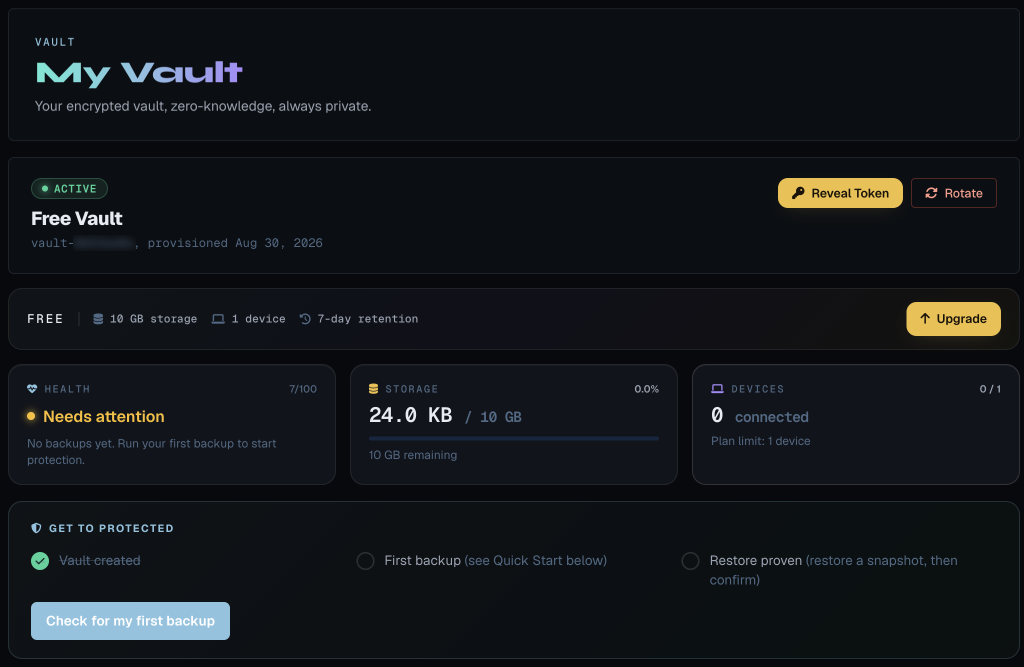
Setting Up the VPS
Conveniently the setup instructions for your VPS or PC are provided on the account page:
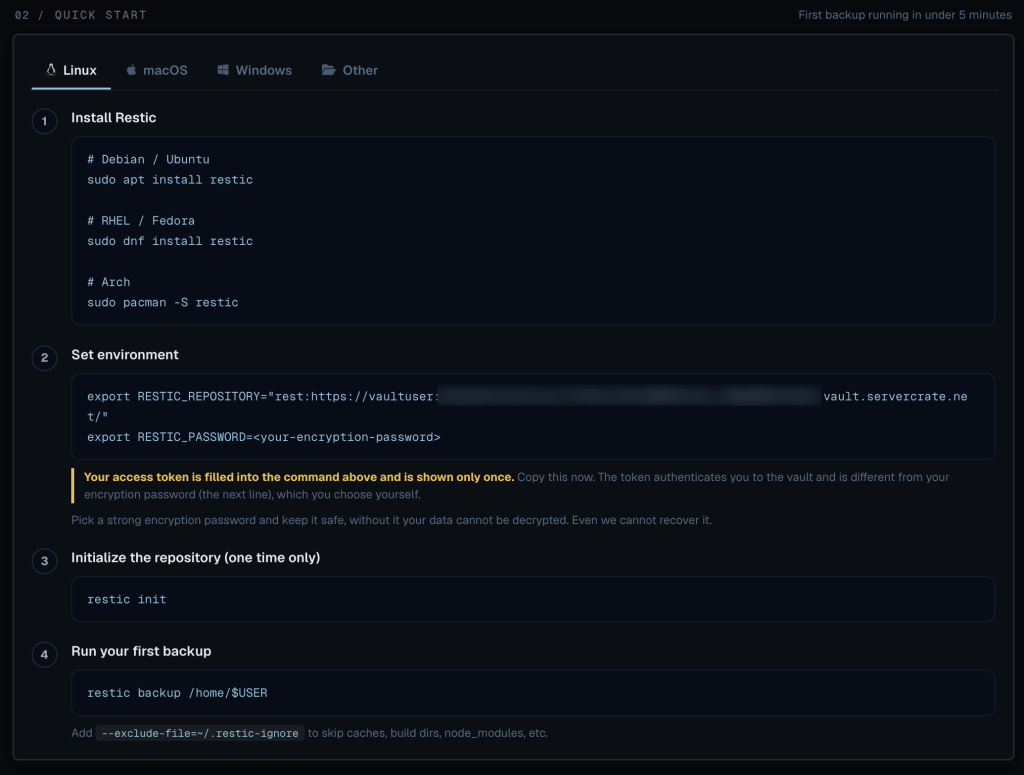
Since this is Debian 13:
apt install restic
Then I copy/pasted the first environment variable. I used this technique to generate a random password:
openssl rand -hex 16
And then I used that in the second environment variable.
Then:
root@vpn-sfo:~# restic init

created restic repository 7261aad455 at rest:https://vaultuser:***@<vaultid>.vault.servercrate.net/

Please note that knowledge of your password is required to access
the repository. Losing your password means that your data is
irrecoverably lost.
At this point I created a quick shell script called servercrate_backup.sh:
#!/bin/bash

export RESTIC_REPOSITORY="rest:https://vaultuser:<vault details>"
export RESTIC_PASSWORD=<password>

restic backup /etc
restic backup /backup
restic backup /root
First Backup
After chmod 755 servercrate_backup.sh, I ran it:
root@vpn-sfo:~# ./servercrate_backup.sh
repository 7261aad4 opened (version 2, compression level auto)
created new cache in /root/.cache/restic
no parent snapshot found, will read all files
[0:00]          0 index files loaded

Files:         709 new,     0 changed,     0 unmodified
Dirs:          215 new,     0 changed,     0 unmodified
Added to the repository: 2.376 MiB (795.495 KiB stored)

processed 709 files, 1.890 MiB in 0:01
snapshot bc1e6708 saved
repository 7261aad4 opened (version 2, compression level auto)
no parent snapshot found, will read all files
[0:00] 100.00%  1 / 1 index files loaded

Files:           9 new,     0 changed,     0 unmodified
Dirs:            1 new,     0 changed,     0 unmodified
Added to the repository: 2.758 MiB (330.898 KiB stored)

processed 9 files, 2.755 MiB in 0:01
snapshot d8901910 saved
repository 7261aad4 opened (version 2, compression level auto)
no parent snapshot found, will read all files
[0:00] 100.00%  2 / 2 index files loaded

Files:          10 new,     0 changed,     0 unmodified
Dirs:            5 new,     0 changed,     0 unmodified
Added to the repository: 10.728 MiB (10.713 MiB stored)

processed 10 files, 10.722 MiB in 0:05
snapshot 4d9e83d1 saved
root@vpn-sfo:~#
You see the three different directories backing up there.
Making It Slightly Prettier
I could have made the script a little fancier so the output was a little more comprehensible:
for dir in /etc /backup /root ; do
	echo "$(date) starting backup of ${dir}"
	restic backup ${dir}
	echo "$(date) completed backup of ${dir}"
done
Running servercrate_backup.sh now looks like this (changes in bold):
root@vpn-sfo:~# ./servercrate_backup.sh
Mon Aug 31 19:44:58 PDT 2026 starting backup of /etc
repository 7261aad4 opened (version 2, compression level auto)
using parent snapshot bc1e6708
[0:00] 100.00%  3 / 3 index files loaded

Files:           0 new,     0 changed,   709 unmodified
Dirs:            0 new,     0 changed,   215 unmodified
Added to the repository: 0 B   (0 B   stored)

processed 709 files, 1.890 MiB in 0:01
snapshot f14927d9 saved
Mon Aug 31 19:44:59 PDT 2026 completed backup of /etc
Mon Aug 31 19:44:59 PDT 2026 starting backup of /backup
repository 7261aad4 opened (version 2, compression level auto)
using parent snapshot d8901910
[0:00] 100.00%  3 / 3 index files loaded

Files:           0 new,     0 changed,     9 unmodified
Dirs:            0 new,     0 changed,     1 unmodified
Added to the repository: 0 B   (0 B   stored)

processed 9 files, 2.755 MiB in 0:01
snapshot 42d6a1ed saved
Mon Aug 31 19:45:00 PDT 2026 completed backup of /backup
Mon Aug 31 19:45:00 PDT 2026 starting backup of /root
repository 7261aad4 opened (version 2, compression level auto)
using parent snapshot 4d9e83d1
[0:00] 100.00%  3 / 3 index files loaded

Files:           0 new,     2 changed,     8 unmodified
Dirs:            0 new,     1 changed,     4 unmodified
Added to the repository: 17.362 KiB (3.269 KiB stored)

processed 10 files, 10.722 MiB in 0:01
snapshot 6b2c26d6 saved
Mon Aug 31 19:45:02 PDT 2026 completed backup of /root
Now let’s look in our ServerCrate panel:
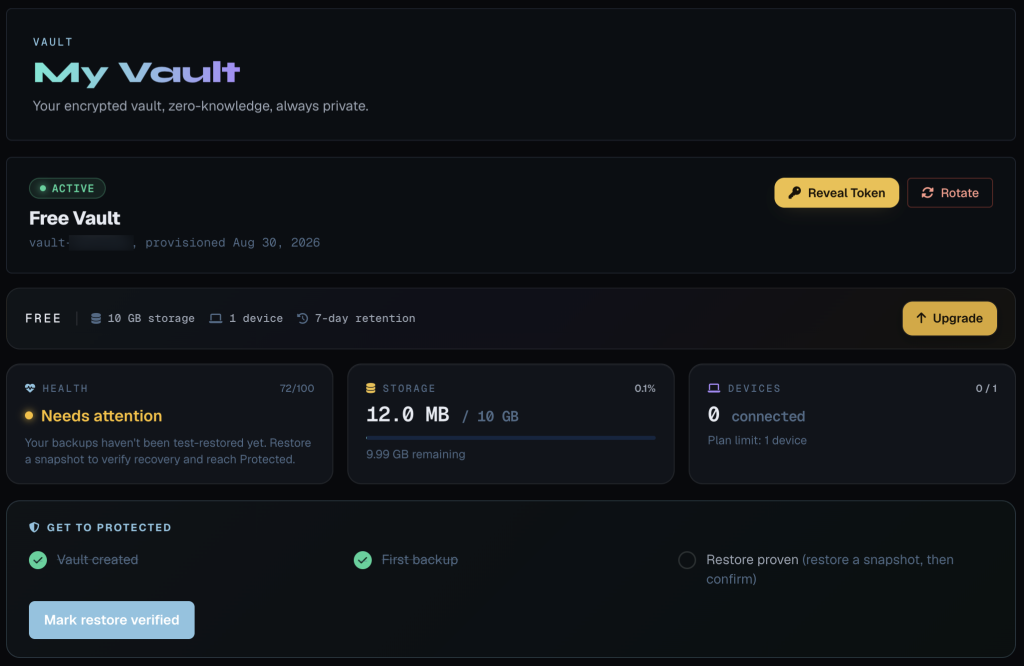
BTW, notice the compression. 12MB used out but we backed up 20.1MB of files:
# du -sh /etc /backup /root
5.3M	/etc
2.8M	/backup
12M	/root
Restore Test
You’ll notice that ServerCrate is bringing something important to our attention:
Your backups haven’t been test-restored yet. Restore a snapshot to verify recovery and reach Protected.
Good idea. Let’s do that.
First, let’s see what snapshots we have:
# restic snapshots
repository 7261aad4 opened (version 2, compression level auto)
ID        Time                 Host                  Tags        Paths    Size
------------------------------------------------------------------------------------
bc1e6708  2026-08-31 19:41:12  vpn-sfo.lowend.party              /etc     1.890 MiB
d8901910  2026-08-31 19:41:14  vpn-sfo.lowend.party              /backup  2.755 MiB
4d9e83d1  2026-08-31 19:41:16  vpn-sfo.lowend.party              /root    10.722 MiB
f14927d9  2026-08-31 19:44:58  vpn-sfo.lowend.party              /etc     1.890 MiB
42d6a1ed  2026-08-31 19:44:59  vpn-sfo.lowend.party              /backup  2.755 MiB
6b2c26d6  2026-08-31 19:45:00  vpn-sfo.lowend.party              /root    10.722 MiB
------------------------------------------------------------------------------------
6 snapshots
root@vpn-sfo:~#
Let’s try restoring /etc to /tmp/restore.
I’m going to take the first snapshot in that list:
root@vpn-sfo:~# mkdir /tmp/restore
root@vpn-sfo:~# restic restore bc1e6708 --target /tmp/restore
repository 7261aad4 opened (version 2, compression level auto)
[0:00] 100.00%  4 / 4 index files loaded
restoring snapshot bc1e6708 of [/etc] at 2026-08-31 19:41:12.51263036 -0700 PDT by root@vpn-sfo.lowend.party to /tmp/restore
Summary: Restored 1520 files/dirs (1.890 MiB) in 0:00
root@vpn-sfo:~# find /tmp/restore -type f -print | wc -l
709
Nice!
Conclusion
As you can see, backing up with ServerCrate is dead simple. The interface is very nice and holds your hand through setup and use. Pricing is pretty reasonable, too:
- 10GB of data from 1 device is FREE
- 200GB from 1 device is $5/month
- 1TB from up to 3 devices is $15/month
- And of course bigger plans are available, too
Worth pointing out:
- Restic and ServerCrate don’t care where the data originated, so you could consolidate data from several systems to one and then back up from there to fit within limits.
- Restic does both compression and deduplication, so your GBs stretch a lot further than just the current size on disk.
Backups are super-important! If you are implementing the classic 3-2-1 strategy (3 backups on 2 different types of media, 1 of which is off-site), ServerCrate can be an excellent part of that strategy.
Related Posts:
You Need Backups and ServerCrate is Going to Make Them Painless - Start for FREE!
Please, for the Love of Your Data and Your Own Sanity, Keep Off-Site Backups!
What if Your Provider's Storage Gets Corrupted?
PSA: Your Data is Not Safe on Just One Cloud (AWS Nuked a 10-Year Account and All Data Without Warni...
Snapshots vs Backups Explained, And Why You Need Both in Your Life
Four Customers Who Found Out the Hard Way You Need To Backup Your Cloud Data

raindog308 is a longtime community LETizen, technical writer, and self-described techno polymath. With deep roots in the *nix world, he has a passion for systems both modern and vintage, ranging from Unix, Perl, Python, and Golang to shell scripting and mainframe-era operating systems like MVS. He’s equally comfortable with relational database systems, having spent years working with Oracle, PostgreSQL, and MySQL.
As an avid user of LowEndBox providers, raindog308 runs an empire of LEBs, from tiny boxes for VPNs, to mid-sized instances for application hosting, and heavyweight servers for data storage and complex databases. He brings both technical rigor and real-world experience to every piece he writes.
Beyond the command line, raindog308 has a life-long love of German Shepherd Dogs, high-quality knives, target shooting, theology, tabletop RPGs, playing guitar, and hiking in deep, quiet forests.
His goal with every article is to help users, from beginners to seasoned sysadmins, get more value, performance, and enjoyment out of their infrastructure.
You can find him daily in the forums at LowEndTalk under the handle @raindog308.
























Leave a Reply