


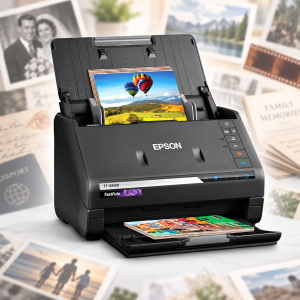
 If you were born in the 21st century, the idea of scanning photos may seem archaic to you. And it certainly is.
But there are still tons of paper photos out there. I’m old enough to have some, and then I inherited boxes and photo albums from departed relatives. I needed to free up some shelf space so I decided to look at digitizing the entire collection.
If you have a significant quantity of photos, forget scanning services. They’re way too expensive, averaging 25 cents a photo or more. I invested $559 in an Epson FastFoto FF-680W scanner. With over 8,000 photos scanned, my cost is a little under 7 cents a photo, which is about 25% of what I’d have paid to ship them all to a third-party scanning service.
Powerful and Flawless
I bought mine on Amazon. This isn’t a paid review.
The device has been flawless over those 8,000 scans. Plus I subsequently scanned several hundred pages of paper documents as well.
Some cool features:
- You can stack 30 or 40 photos at a time (or sheets of paper) and it just flies through them.
- It does both front and back scanning at the same time, and intelligently determines if there’s anything on the back side worth scanning. So if someone made a note on the back of a photo, or if it’s a two-sided document, you’re covered. Sometimes this does result in some junk jpegs because sometimes photo developers back in the day would print a control number or something on the back of photos.
- You can tag photos with a name (e.g., “Family”) and it will intelligently number them. It will look in the destination directory and if there’s a “Family 157a.jpg” it will start with 158 next time.
- A slip cover is included if you have photos that have sticky or gummy residue on them.
- When you get a jam (which is very rare, but can happen if you forget to unstaple documents for example), it intelligently picks up after resolving it.
- There’s auto-correcting color, redeye removal, etc. You can choose to either make this the default save, or save both before and after. You can also choose which resolution you want (I use 600dpi).
It can be setup to scan wirelessly but I use it plugged in over USB. I figure I’m going to be sitting right next to it anyway.
I’ve been truly delighted by this product, which has reduced several banker’s boxes of photos and a couple shelves’ of photo albums to a manageable, sorted folder on my Dropbox.
I saw in a number of reviews that users planned to buy one, scan all their photos, and then resell it to recoup part of their investment. I considered that but it’s been so awesome on scanning paper documents that I plan to keep it as a digitizing workhorse in my home.

raindog308 is a longtime community LETizen, technical writer, and self-described techno polymath. With deep roots in the *nix world, he has a passion for systems both modern and vintage, ranging from Unix, Perl, Python, and Golang to shell scripting and mainframe-era operating systems like MVS. He’s equally comfortable with relational database systems, having spent years working with Oracle, PostgreSQL, and MySQL.
As an avid user of LowEndBox providers, raindog308 runs an empire of LEBs, from tiny boxes for VPNs, to mid-sized instances for application hosting, and heavyweight servers for data storage and complex databases. He brings both technical rigor and real-world experience to every piece he writes.
Beyond the command line, raindog308 has a life-long love of German Shepherd Dogs, high-quality knives, target shooting, theology, tabletop RPGs, playing guitar, and hiking in deep, quiet forests.
His goal with every article is to help users, from beginners to seasoned sysadmins, get more value, performance, and enjoyment out of their infrastructure.
You can find him daily in the forums at LowEndTalk under the handle @raindog308.























Leave a Reply