


 This Cyber Monday, DediRock had a fantastic deal for our readers.
- 1.5 GB RAM
- 1x vCore CPU
- 25 GB SSD
- 2.5 TB Bandwidth
- 1 Gbps Network Port
- 1 IPv4
- $6.85/Yr
- New York or Los Angeles
And btw, it’s STILL AVAILABLE.
1.5GB with IPv4 for less than $7/year? How could I say no?
I signed up for Los Angeles.
Intended Use
I have a couple ideas for this VPS:
- The VPS I was using for my disposable email (Inbucket) is coming up for renewal. This is the ultimate low-resource application. Just receives a random email here and there (and never sends any).
- I can always use another VPN.
- I often build and tear down systems when doing LEB tutorials, especially if it’s not something I personally use or if I want to try it on a distro I don’t use. It’s really tempting to just fire up a Vultr for an hour, but that doesn’t really represent the LowEnd community’s typical experience.
Sign Up
This was effortless. I got the new VPS email almost instantly after paying. I used my real name and wasn’t using a VPN, and don’t have any reports on. Fraud Record, so no problems.
I always chuckle when I see this stock message in the “New VPS” email:
PLEASE READ THIS EMAIL IN FULL AND PRINT IT FOR YOUR RECORDS
I have gotten those emails for 15+ years and I’ve never printed a single one. But I digress…
I do wish there had been the opportunity to submit ssh keys and/or a startup script. That really should be the norm for providers but most don’t offer this.
Panel
The panel is integrated into WHMCS. A pet peeve of mine is when I can’t find a link to the panel on the provider’s web site and have to hunt down the URL in an email. Here, you just go to the client area and the panel is right there, so kudos to DediRock for that.
Here’s a look:
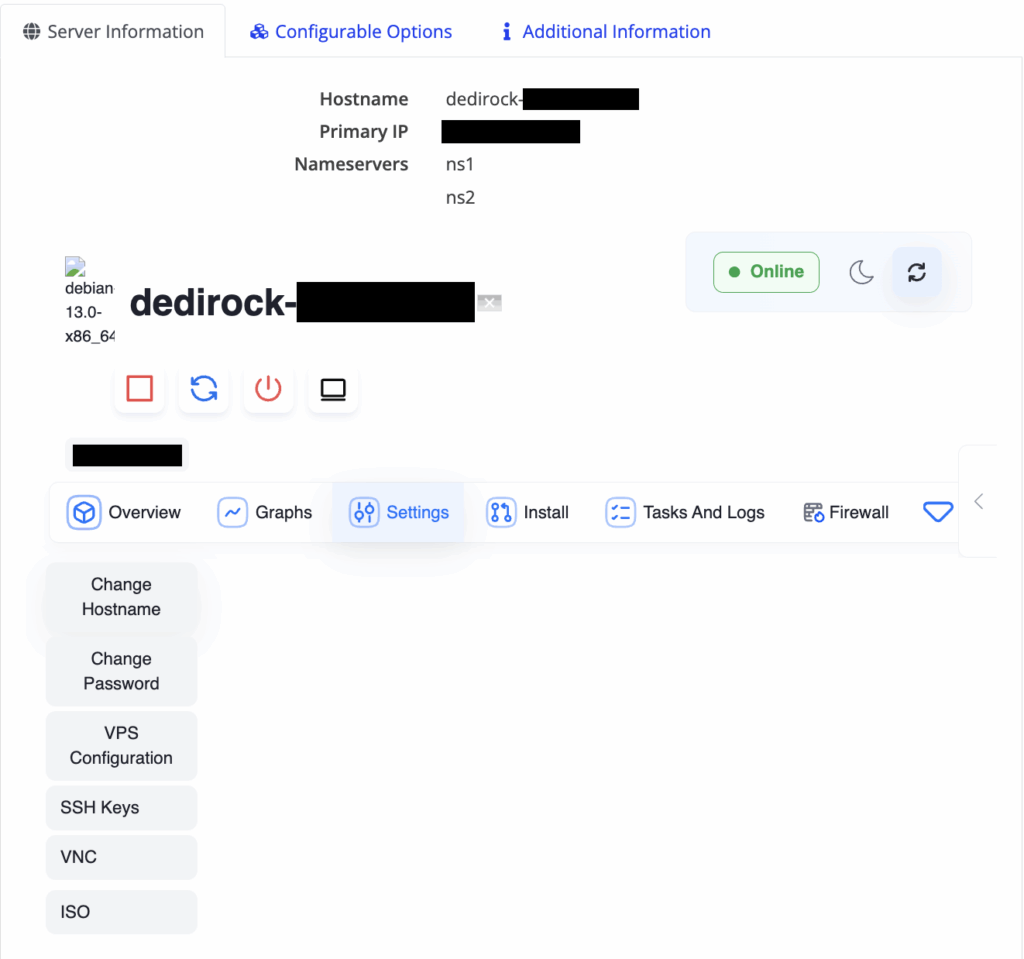
The Reverse DNS (a drop down not shown above) does present the form, which I filled out and submitted. However, after an hour, doing an nslookup on the IP from my laptop still returned a colocrossing.com name, which is not what I put in. I realize propagation can take a little bit but I’ve never had reverse DNS take that long
The VPS
Every provider and template has its quirks. A few I noticed:
- Strangely, there was a known_hosts and a known_hosts.old in /root/.ssh. Not a big deal.
- DediRock does not have a local mirror, so updating went to debian.org. Again, not a big deal, and not unusual. The template was relatively up to date, so my “apt upgrade” didn’t have a lot to do (36 packages, took about 3 minutes)
- Time zone was set to Asia/Kolkata because…we’re in Los Angeles?!? dpkg-reconfigure fixed it
- The system comes with a 1.5GB swap file cleverly named /swapfile. I always wonder if a swapfile isn’t slightly slowed than a dedicated swap partition…but then, you really shouldn’t be swapping anyway.
All of this is taken care of by my setup ansible script anyway.
I remember a time when you got a VPS and a bunch of things were setup and running, including apache. Fortunately, those days are mostly gone. here, only sshd and essential daemons are running. Kudos. (I do think NTP should be on by default by maybe that’s just my preference).
I averaged 43ms ping times from Portland, Oregon.
Overall
No issues. VPS setup and has been running fine. Hopefully the panel issues are either temporary or something they’re still working on.
The VM is performant enough for my needs. I tend to login and do stuff over ssh so the network latency is something I immediately notice – no problems there.
And hey, it only cost $6.85/year 😀 Even if it’s not perfect, it’s still an awesome buy.
YABS
You can also see this YABS on ServerVerify, where you can compare it to thousands of other YABS, read reviews, and do detailed research on any provider!
# ## ## ## ## ## ## ## ## ## ## ## ## ## ## ## ## ## #
#              Yet-Another-Bench-Script              #
#                     v2025-04-20                    #
# https://github.com/masonr/yet-another-bench-script #
# ## ## ## ## ## ## ## ## ## ## ## ## ## ## ## ## ## #

Mon Dec 15 09:04:44 PM IST 2025

Basic System Information:
---------------------------------
Uptime     : 0 days, 16 hours, 18 minutes
Processor  : QEMU Virtual CPU version 2.5+
CPU cores  : 1 @ 2793.378 MHz
AES-NI     : ❌ Disabled
VM-x/AMD-V : ❌ Disabled
RAM        : 1.4 GiB
Swap       : 1.5 GiB
Disk       : 24.5 GiB
Distro     : Debian GNU/Linux 13 (trixie)
Kernel     : 6.12.41+deb13-amd64
VM Type    : KVM
IPv4/IPv6  : ✔ Online / ❌ Offline

IPv4 Network Information:
---------------------------------
ISP        : HostPapa
ASN        : AS36352 HostPapa
Host       : RackNerd LLC
Location   : Los Angeles, California (CA)
Country    : United States

fio Disk Speed Tests (Mixed R/W 50/50) (Partition /dev/vda1):
---------------------------------
Block Size | 4k            (IOPS) | 64k           (IOPS)
  ------   | ---            ----  | ----           ----
Read       | 22.87 MB/s    (5.7k) | 321.10 MB/s   (5.0k)
Write      | 22.88 MB/s    (5.7k) | 322.79 MB/s   (5.0k)
Total      | 45.75 MB/s   (11.4k) | 643.89 MB/s  (10.0k)
           |                      |
Block Size | 512k          (IOPS) | 1m            (IOPS)
  ------   | ---            ----  | ----           ----
Read       | 2.18 GB/s     (4.2k) | 3.32 GB/s     (3.2k)
Write      | 2.29 GB/s     (4.4k) | 3.54 GB/s     (3.4k)
Total      | 4.47 GB/s     (8.7k) | 6.87 GB/s     (6.7k)

iperf3 Network Speed Tests (IPv4):
---------------------------------
Provider        | Location (Link)           | Send Speed      | Recv Speed      | Ping
-----           | -----                     | ----            | ----            | ----
Clouvider       | London, UK (10G)          | 779 Mbits/sec   | 419 Mbits/sec   | 136 ms
Eranium         | Amsterdam, NL (100G)      | 807 Mbits/sec   | 612 Mbits/sec   | 159 ms
Uztelecom       | Tashkent, UZ (10G)        | 460 Mbits/sec   | 175 Mbits/sec   | 253 ms
Leaseweb        | Singapore, SG (10G)       | 181 Mbits/sec   | 229 Mbits/sec   | 181 ms
Clouvider       | Los Angeles, CA, US (10G) | 899 Mbits/sec   | 920 Mbits/sec   | 0.544 ms
Leaseweb        | NYC, NY, US (10G)         | 477 Mbits/sec   | 336 Mbits/sec   | 69.3 ms
Edgoo           | Sao Paulo, BR (1G)        | 624 Mbits/sec   | 260 Mbits/sec   | 232 ms

Geekbench 6 Benchmark Test:
---------------------------------
Test            | Value
                |
Single Core     | 710
Multi Core      | 786
Full Test       | https://browser.geekbench.com/v6/cpu/15589954

YABS completed in 20 min 12 sec
Related Posts:
You Need Backups and ServerCrate is Going to Make Them Painless - Start for FREE!
Live the i9 Dream! DediRock's i9-Powered Deals Are Here! And So Much More
To Err Is Human, To Come Back With An Exclusive Offer Is Godlike! 2GB VPS in LA/NJ/Amsterdam for $4/...
ColoCrossing's Dedicated Server Sale Features Systems as Low as $25/Month! Los Angeles and Buffalo!
Quick! Grab 31 Entries for ServerHost's MacBook Neo Giveaway - And Get In On Cheap Ryzen/i9 Deals ...
Big News From ServerHost: Cheap Ryzen/i9 Deals, Plus a BONUS CODE for the MacBook Neo Giveaway!

raindog308 is a longtime community LETizen, technical writer, and self-described techno polymath. With deep roots in the *nix world, he has a passion for systems both modern and vintage, ranging from Unix, Perl, Python, and Golang to shell scripting and mainframe-era operating systems like MVS. He’s equally comfortable with relational database systems, having spent years working with Oracle, PostgreSQL, and MySQL.
As an avid user of LowEndBox providers, raindog308 runs an empire of LEBs, from tiny boxes for VPNs, to mid-sized instances for application hosting, and heavyweight servers for data storage and complex databases. He brings both technical rigor and real-world experience to every piece he writes.
Beyond the command line, raindog308 has a life-long love of German Shepherd Dogs, high-quality knives, target shooting, theology, tabletop RPGs, playing guitar, and hiking in deep, quiet forests.
His goal with every article is to help users, from beginners to seasoned sysadmins, get more value, performance, and enjoyment out of their infrastructure.
You can find him daily in the forums at LowEndTalk under the handle @raindog308.























Leave a Reply