


 Today we’re featuring AtlasPing, a company based in Singapore that offers feature-packed monitoring for your website or server.
Sign up and you can monitor ping or HTTPS, create notification rules and lists, and manage blackouts and maintenance windows all from their compact, easy-to-use web interface. And they have a generous free tier!
AtlasPing which is a newly launched uptime monitoring and blacklist monitoring platform that helps users and web-hosting providers to easily monitor and convey the health of their websites and servers from a single platform. We might be new as a uptime and blacklist monitoring platform, but we are not new in the industry as we are run by the same folks behind HostWithLove. Coming from a hosting provider background, we believe we understand the challenges faced by companies monitoring a large number of servers and so we have designed a platform to help improve uptime and blacklist monitoring for everyone.
Features
Here’s some more about AtlasPing…then scroll down for some screenshots from my usage…plus a special offer for our readers!
What differentiates us from other uptime and blacklist monitoring services is our customizable and intelligent approach in doing a lot of things, in terms of alerting, automation and configurations.
For uptime alerts, apart from the usual delay alert and repeat alerts, we also have two features that we call “Down Summaries” and “Periodic Report” which are both very useful for users or companies with a large number of monitors. For Down Summaries, if multiple monitors are down at the same time, a summarized alert is sent as frequently as once every hour to inform the user that x monitors are still experiencing downtime – this helps to communicate faster to users and companies, rather than having to review and consolidate every single down alert because now they are kept informed of the status of all their configured monitors once per hour. For Periodic Reports, we like to think of this as a newspaper. Imagine being a system administrator overseeing hundreds of servers, you may want to get an overview of server status over the past 24 hours, past week or past month, so for instance if you select the 24 hours periodic report, an alert comprising of downtime and blacklisting incidents over the past 24 hours will be sent to you, keeping you up to date of issues that arose over the past 24 hours window.
Downtime incidents can also be configured to automatically push to your status page so users are kept updated on incidents and recovery. This is also intelligently tied up with maintenance windows, so if an outage occurs during a maintenance (whether planned or started after the incident), then its severity is reduced from Major to Minor.
For Status Pages, we also provide a way higher level of configuration as compared to other platforms. Users can choose to expand/collapse the groups on the status page by default, show or hide the number of monitors per group, and also show or hide past incident history.
For Blacklist Monitors, we allow users to create subset RBL lists from what we provide, so that they can monitor their IP assets against that smaller RBL list instead. This is useful because all blacklist monitoring platform that we’ve seen so far only allow users to ignore RBLs per IP Address basis, which is tedious to do for hundreds or thousands of IP Addresses.
Special Offer
The promo code (LET40) gives a 40% recurring discount and is a launch exclusive promotion!
Using the LET40 promotion code that gives a 40% recurring discount, prices for basic packages start from $5.34/month or $53.40/year while prices for the highest package are just $25.74/month or $257.40/year, which are almost half the price of the next cheapest provider.
Learn more on their web site, and be sure to read their terms. You can ping @AtlasPing on LowEndTalk.
Taking AtlasPing for a Spin
I decided to give AtlasPing a spin, and setup monitors for LowEndBox, LowEndTalk, and ServerVerify.
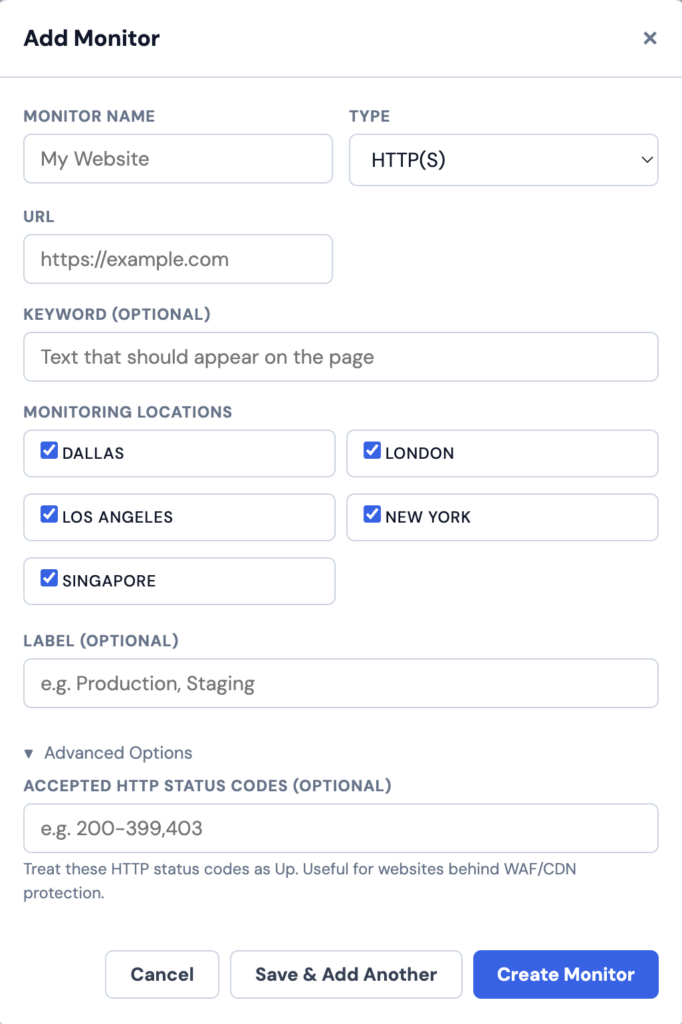
After letting it run for a little bit, here’s what LowEndBox’s panel looks like:
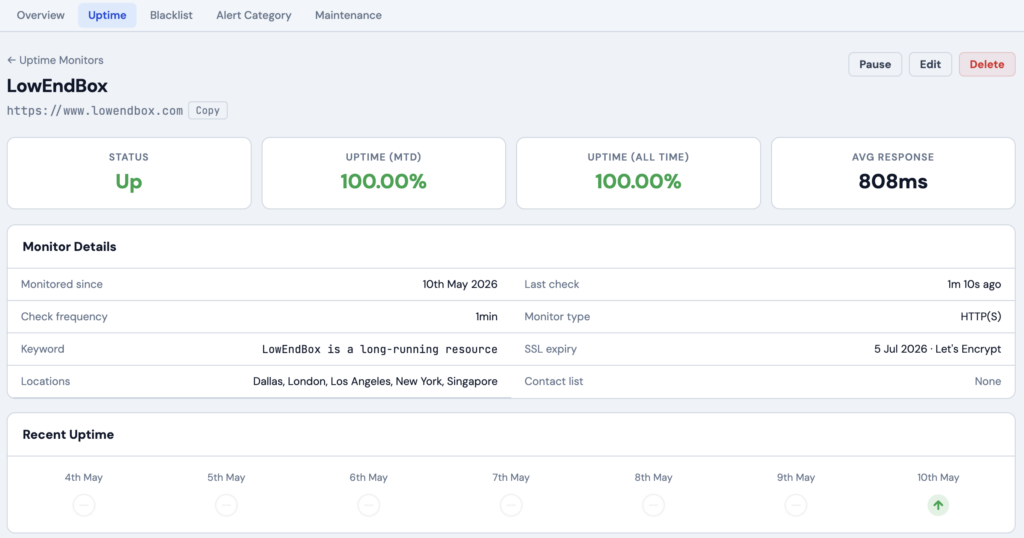
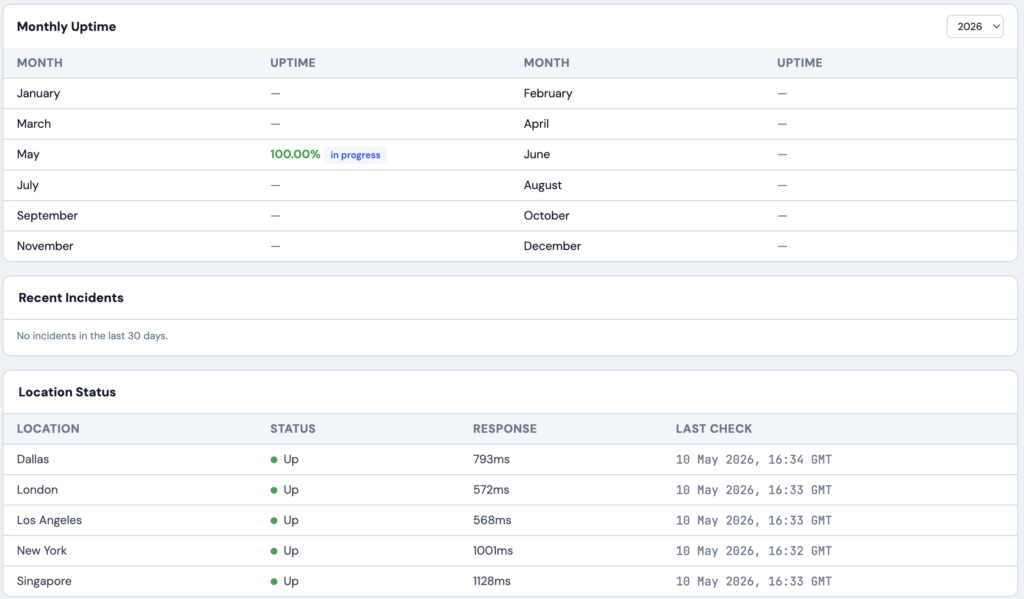
As you can tell, LEB is hosted in New York (100ms). Nice that coverage is from multiple points around the globe, which gives you not only uptime but some idea of performance. This is an HTTPS monitor, so what you’re seeing are load times.
Interestingly, when I setup a monitor for LowEndTalk, every attempt to connect failed:

This is not surprising. wget shows the same:

Why is this? CloudFlare. LowEndTalk uses CloudFlare’s most powerful anti-DDoS protections, plus a variety of custom rules.
I asked AtlasPing about this. Their response:
As you have correctly mentioned, it is possible there are some custom CloudFlare rules in place or additional DDoS or firewall/bot protection measures that are causing this. For majority of users though, this shouldn’t be an issue as we have tested it on websites proxied through CloudFlare and it works without any issue, so assuming this is CloudFlare related, then it is definitely due to additional rules.
As work-around, a user has two options:
(1) Update the affected monitor’s settings > Advanced Settings > Allowed Status Codes and enter “403” so that the 403 error code is also reported as Up. This works if the user isn’t monitoring for keywords and just wants to get an indication of whether the webserver is reporting as up. Technically it would report a correct result because if the webserver is down then it wouldn’t even report a 403 error.
OR
(2) Whitelist our probes’ IP Addresses – this should normally allow them to bypass most firewall rules that may be causing the 403 error. We are working on providing a separate documentation site that will provide more granular details into the setup and configuration process and also for users to whitelist our probes’ IP Addresses.
Makes sense.
Related Posts:
Build Your Own Status Page with Uptime Kuma on a $1 Per Month VPS
Uptime Kuma: Your New Favorite Self-Hosted Uptime Monitoring Tool
Getting Started with GlobalPing: Hands On!
Run Ping From a Stranger's Apartment: GlobalPing is Coming!
Affordable, Powerful Monitoring: NodePing!
How to Install Nagios on a Ubuntu 20.04 VPS

raindog308 is a longtime community LETizen, technical writer, and self-described techno polymath. With deep roots in the *nix world, he has a passion for systems both modern and vintage, ranging from Unix, Perl, Python, and Golang to shell scripting and mainframe-era operating systems like MVS. He’s equally comfortable with relational database systems, having spent years working with Oracle, PostgreSQL, and MySQL.
As an avid user of LowEndBox providers, raindog308 runs an empire of LEBs, from tiny boxes for VPNs, to mid-sized instances for application hosting, and heavyweight servers for data storage and complex databases. He brings both technical rigor and real-world experience to every piece he writes.
Beyond the command line, raindog308 has a life-long love of German Shepherd Dogs, high-quality knives, target shooting, theology, tabletop RPGs, playing guitar, and hiking in deep, quiet forests.
His goal with every article is to help users, from beginners to seasoned sysadmins, get more value, performance, and enjoyment out of their infrastructure.
You can find him daily in the forums at LowEndTalk under the handle @raindog308.























Leave a Reply